CLUB
Ask “who can make Sunday’s trip?” in a group chat and the answers trickle back one by one.
You count them again, remember who is missing, and ask once more.
MEMBERS
Individual questions land somewhere else entirely.
What you answered last time only exists on somebody’s phone.
In NEWDIH APP, “Surveys” lets you build questions, send them to your players’ inboxes and get the answers back as counts per option and averages. The “Inquiry desk” takes each question from a member as one thread per subject and keeps it as Open or Closed. Both fit within the free allowance of 10 club features.
01 — ASKClub
Build the questions,
then send them.
There are four answer types: Single choice, Multiple choice, Free text and Rating (1-5). Line up the questions, pick who it is for and set a deadline, then send. Until you do, it stays a draft, so you can work on the wording first.
Publishing a draft (recorded in the app)
This is how it lands on the other side of the counter
Pick the audience from Everyone, Guardians or Players. Whichever you pick, it goes to the players’ inboxes.
02 — ANSWERMembers and guardians
It arrives,
and they answer on the spot.
A survey you send lands in the players’ inboxes. Whoever receives it opens “Surveys” in the app and picks an answer right there. Nobody has to hand out links or collect paper forms.
Answering on a phone (recorded in the app)
This is how it comes back to the club
Answers stack up one at a time, in the order people reply. What comes back is how many picked each option, not who picked what.
03 — AGGREGATEClub
The counting
is already done.
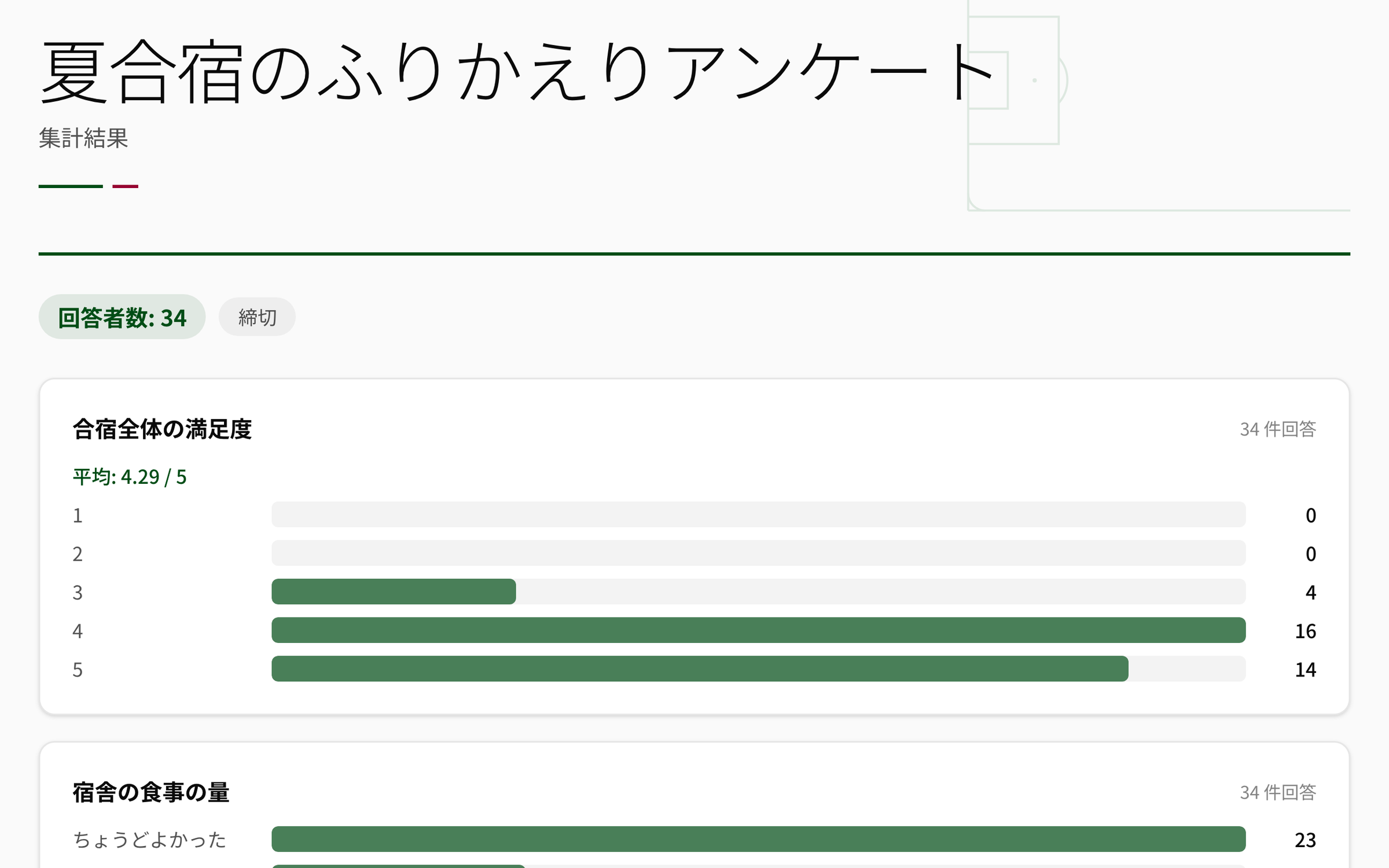
The results screen lists the number of respondents, the count for each option, the average of the 1-5 ratings and every free-text answer. Nothing has to be copied into a spreadsheet and counted.
Survey results (actual screen)
What 21 answers look like
They are already numbers before you start counting. The total is shown right next to each count.
Average of 34 responses
04 — INQUIRYMembers and guardians
Individual questions
come to one desk.
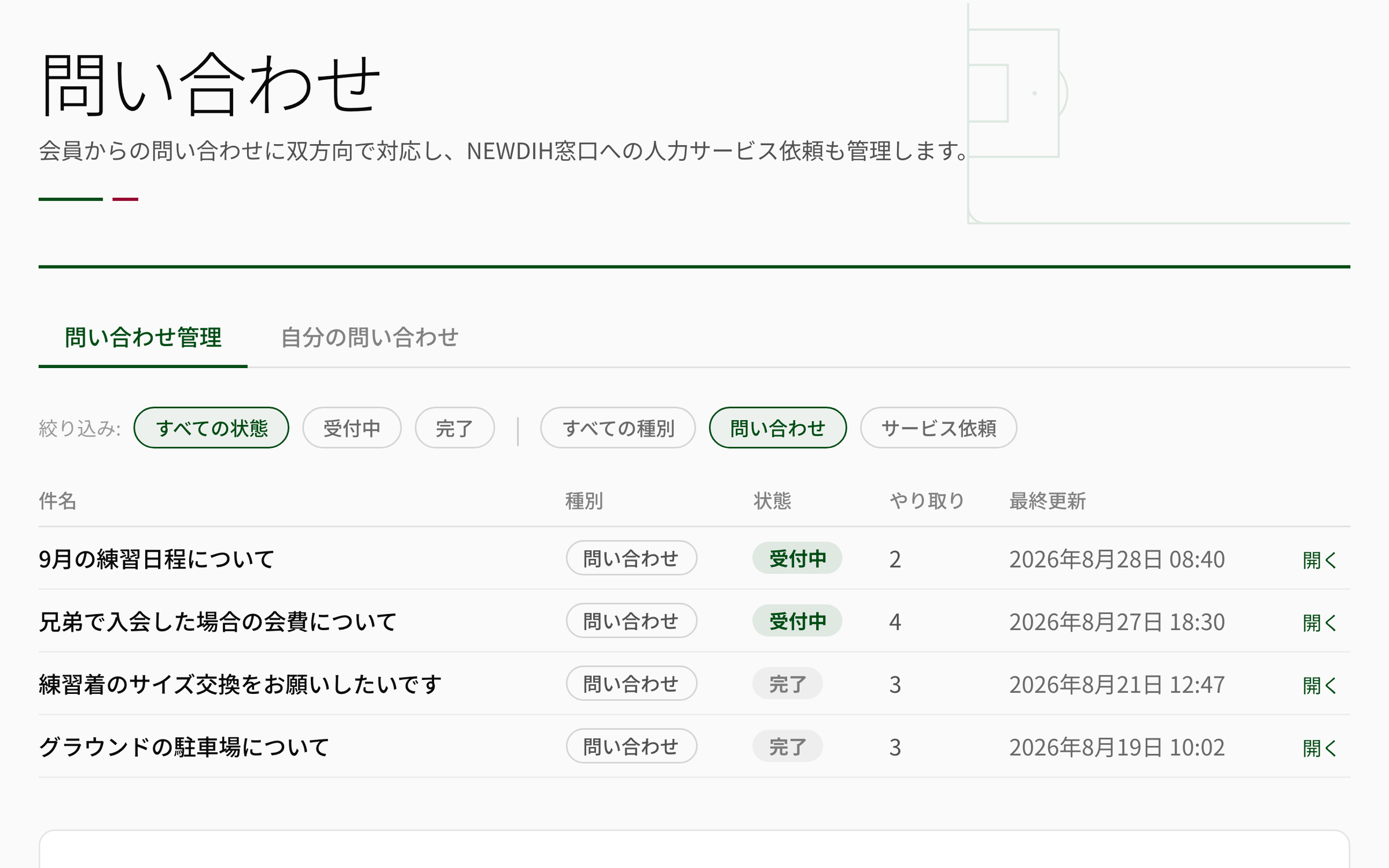
A question like “what happens to the fee if two siblings join?” becomes one thread per subject. The list shows the status, how many messages there are and when it last moved, so a question you forgot to answer shows up.
The list of inquiries (actual screen)
The club stands at the counter
Every question you receive lines up in a list with just two states. Answer it, then close it. That is all.
05 — THREADBoth ways
Messages
are only ever added.
Messages in a thread can only be added — never rewritten, never deleted. Each one is marked as coming from the club or from the member, so “I never said that” does not happen.
Replying, then marking the thread as closed (recorded in the app)
Three steps, starting today.
Surveys and the Inquiry desk both fit within the free allowance of 10 club features. Create your club, add the features, invite the players, and you can send your first survey the same day.
STEP 01
Sign up
Create the club, add the players to the roster and invite them to the app. As soon as someone is linked, surveys start reaching them.
STEP 02
Ask
Build the questions, choose who they are for, set a deadline and send. Answers gather until the deadline and turn into counts and averages on the results screen.
STEP 03
Take it in
Individual questions come in as inquiry threads; answer them and mark them Closed. When you are short-handed, hand the work to the NEWDIH desk.
Frequently Asked Questions
CLUB ANSWERSBoth run within the free allowance of club features. Club features are free up to 10; from the 11th it is a flat ¥10,000/month, however many you add. There is no per-feature price. For the full picture, see the pricing page.
CLUB ANSWERSSurveys always arrive in the players’ inboxes. If you choose “Guardians” as the audience, the player receives it with the wording “Please show this to your guardian”. There is no separate delivery to a guardian’s own account. Players who are on the roster but not linked to the app do not receive it, and that number is shown to you when you send.
CLUB ANSWERSThe results screen shows the number of respondents, the count for each option and the average of the 1-5 ratings. There is no list of names. Free-text answers appear as they were written. One person counts once, so nobody is counted twice.
CLUB ANSWERSThey stay. You can open the results at any time after closing. Only drafts that were never sent can be deleted; a survey you sent stays together with its answers.
CLUB ANSWERSAnnouncements & broadcasts is for telling people something, and read counts come back as numbers. Surveys is for asking and counting, and the chosen answers become counts and averages. The Inquiry desk is for taking questions one by one, and each stays in a thread per subject. All three live in the same app and fit within the free allowance of club features.
CLUB ANSWERSInquiry threads are followed from the list rather than by notification. Each subject shows how many messages there are and when it was last updated, so a thread that has stopped moving is visible. Surveys, on the other hand, are announced through the app’s notices and a push notification when they are sent.
CLUB ANSWERSIt is the desk for work that needs human hands: filling trial sessions, building a website, grant applications. You raise it with a subject from the same screen as inquiries, and the exchange stays in a thread. Members cannot see it. Anything that carries a cost is quoted separately once we have seen what it involves.