ROSTER & KARTE

From the first day to graduation,
one player's story never breaks.

One line in the roster becomes that child's own record. As they move up an age group, change teams, or graduate, everything keeps stacking on the same page.

Player roster and player records are free. Only the alumni directory is ¥1,000/month.

THE PROBLEM

With every handover,
that child starts from zero again.

The name and squad number live in a spreadsheet, the physical details on the paper enrolment form, and the character and the sticking points in the previous coach's head. Every time they move up an age group and change teams, it starts with gathering it all again. NEWDIH ties one record to each line of the roster, and keeps adding to that one page until they leave — and after they leave, too.

01 / REGISTER

01

Hand us the roster exactly as it is.

Excel, CSV, text pasted from an email, or a photo of the paper roster — any of them work. What we read out is shown as a list before anything is saved, so you fix it there and then confirm.

  • SOURCEExcel (.xlsx) / CSV / paste / photo / PDF
  • LIMITUp to 200 players at once. Up to 3 photos, PDF up to 8MB
  • CHECKRows we could not read, duplicate squad numbers and identical names are flagged on the row itself
  • UNDOAfter saving, the whole batch can be undone at once
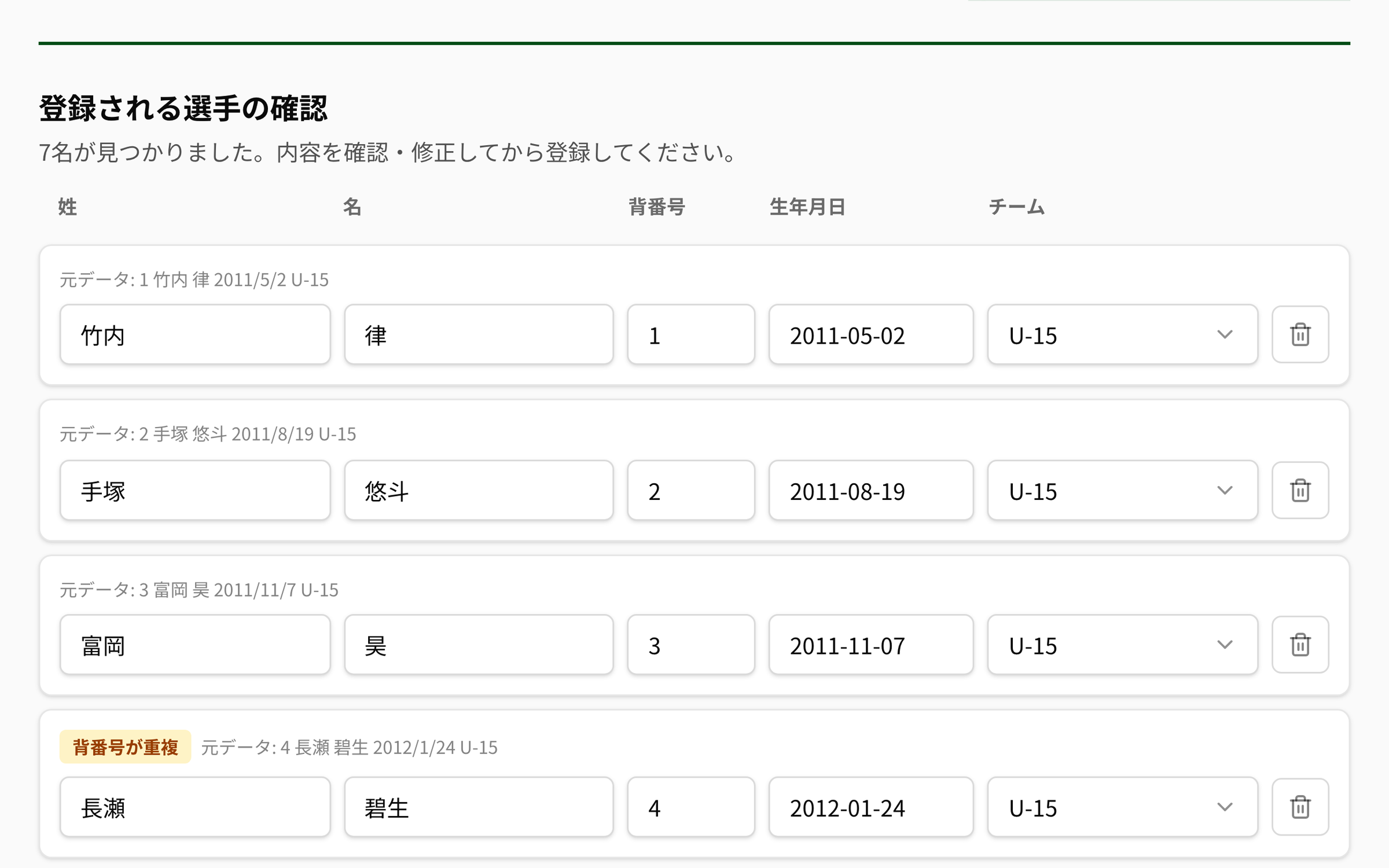
The “bulk import from a roster” screen in NEWDIH APP. Seven players read out of a pasted roster are listed one per row, each with the original text attached, such as “Original: 4 Nagase Aoi 2012/1/24 U-15”. Two rows with a repeated squad number carry a yellow “duplicate squad number” badge, and the last name, first name, squad number, date of birth and team are editable fields.
What we read out is shown with the original line attached. Duplicate squad numbers are fixed on the spot, before saving.

02 / ROSTER

02

The roster is grouped by team.

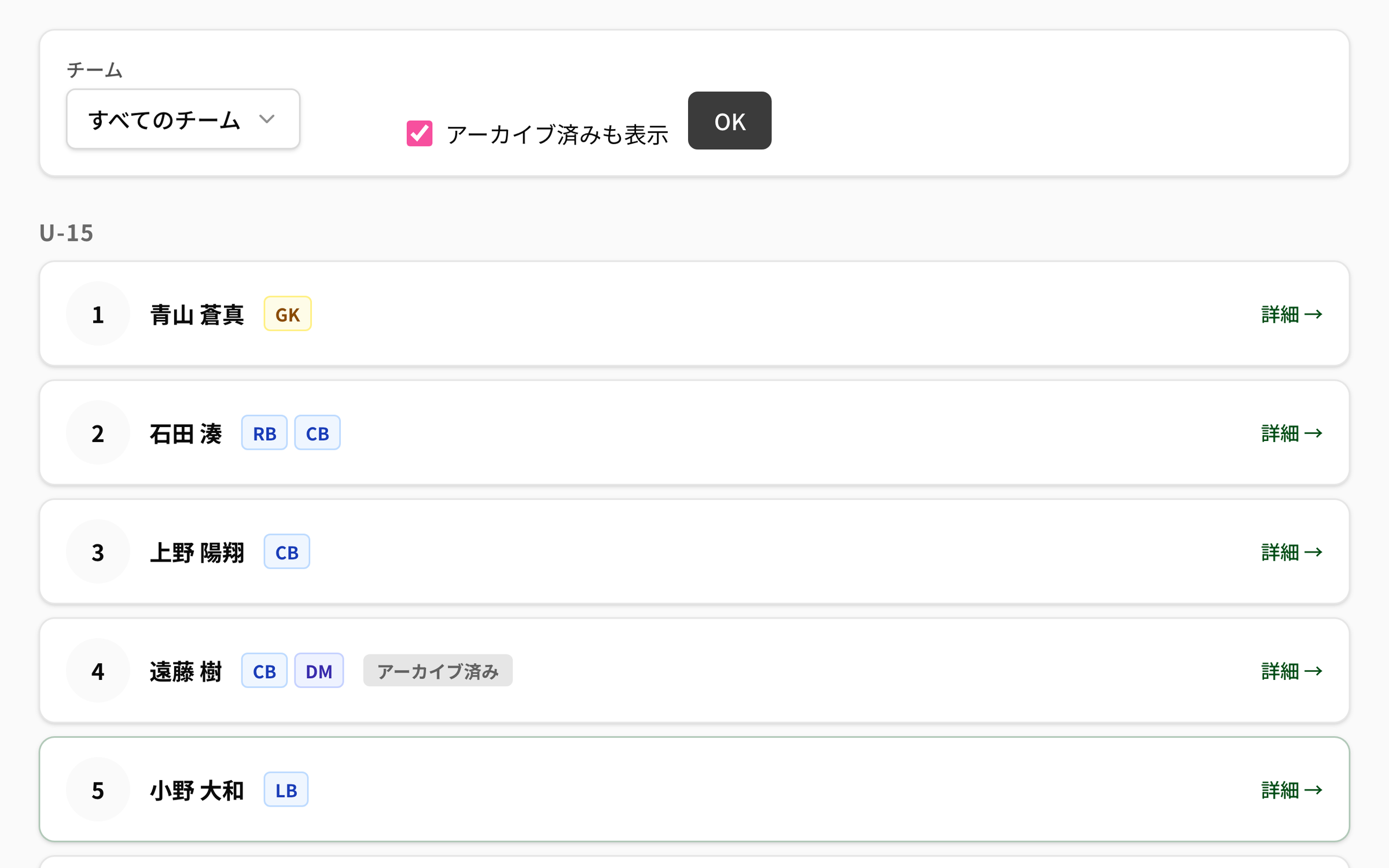
Players are split by team — U-12, U-13, U-15 — and ordered by squad number. Positions are colour-coded by the four groups GK, DF, MF and FW, so you read who plays where before you read the name.

  • LINESquad number / name / positions (two or more are shown side by side)
  • FILTERFilter by team. Archived players can be shown too
  • ARCHIVEArchive with one of three reasons: Graduated, Left or Other. The history stays even after archiving

Archive reasons (exactly the app’s options)

  • Graduated
  • Left
  • Other
The player roster in NEWDIH APP. At the top are the team filter and the “show archived too” checkbox, and below them the U-15 players in squad-number order. Each row is a squad number, a name and position badges (GK in yellow, CB and RB in blue, DM in indigo), and the row for number 4, who has left, carries a grey “Archived” badge.
Positions are separated by the GK, DF, MF and FW colours. Archived players line up too once you switch the view on.

03 / KARTE

03

Open one line and you get one record.

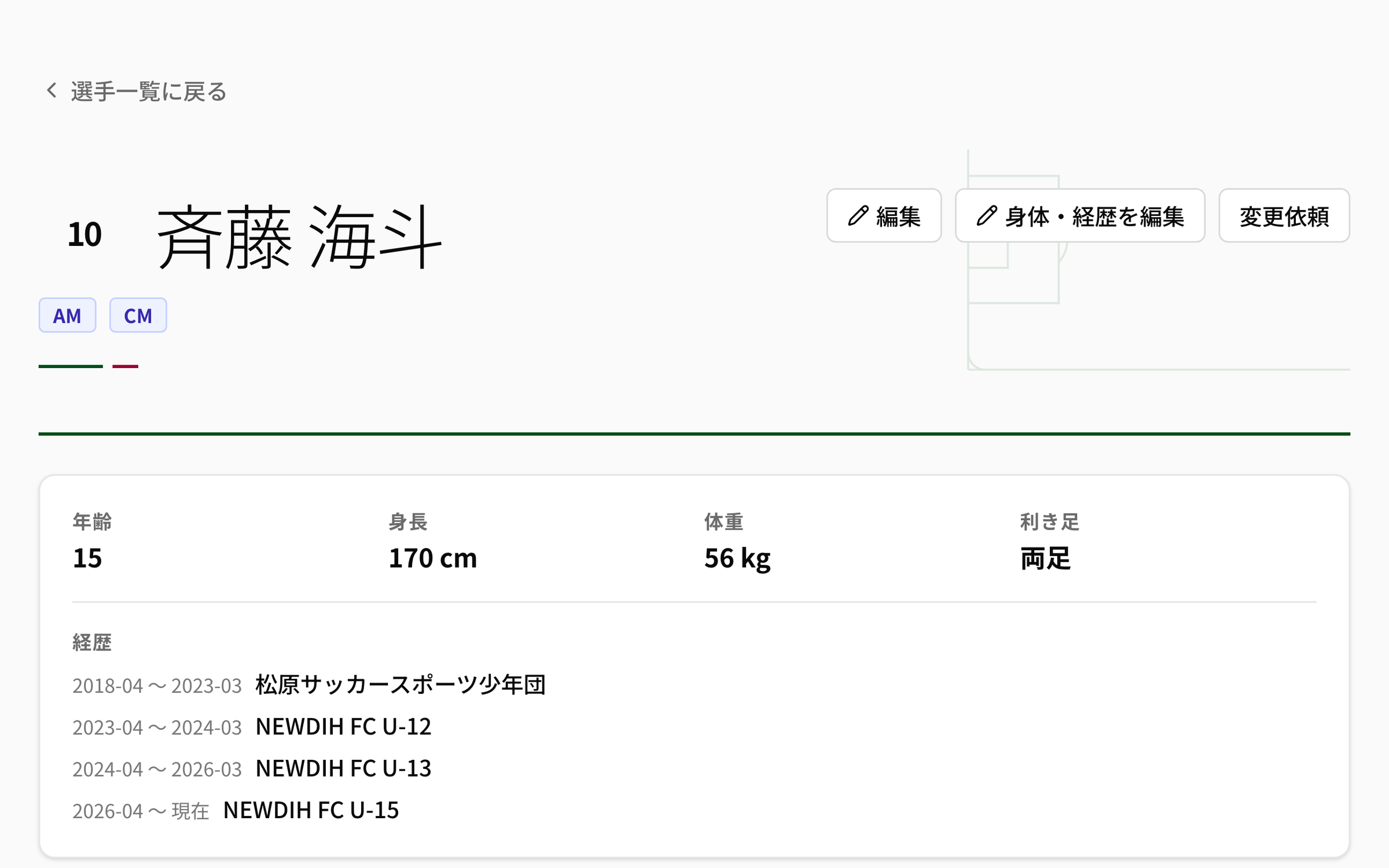
A line of the roster is the cover page of that player's own record. Age, height, weight, dominant foot and which clubs they came from all sit on the first screen.

  • BODYAge, height, weight, dominant foot
  • CAREER“From when / until when / where” — up to 20 entries
  • OWNERPhysical details and career history are edited by the player in NEWDIH Passport
  • COACHIf the player is officially registered with the club, a coach can edit them directly, and the player submits a change request instead
The top of a player record in NEWDIH APP. The squad number 10 and the name sit next to the AM and CM position badges, and the card below shows age 15, height 170 cm, weight 56 kg and dominant foot both, side by side. Further down, “Career history” lists four rows in chronological order, from 2018-04 – 2023-03 Matsubara Soccer Sports Club to 2026-04 – present NEWDIH FC U-15.
The cover page. The physical details and where they have played football until now come first.

04 / PERSIST

04

A persistent ID belongs to the child.

The record is tied to the player, not to the team. Even when the team changes and the coach changes, it keeps stacking on the same page.

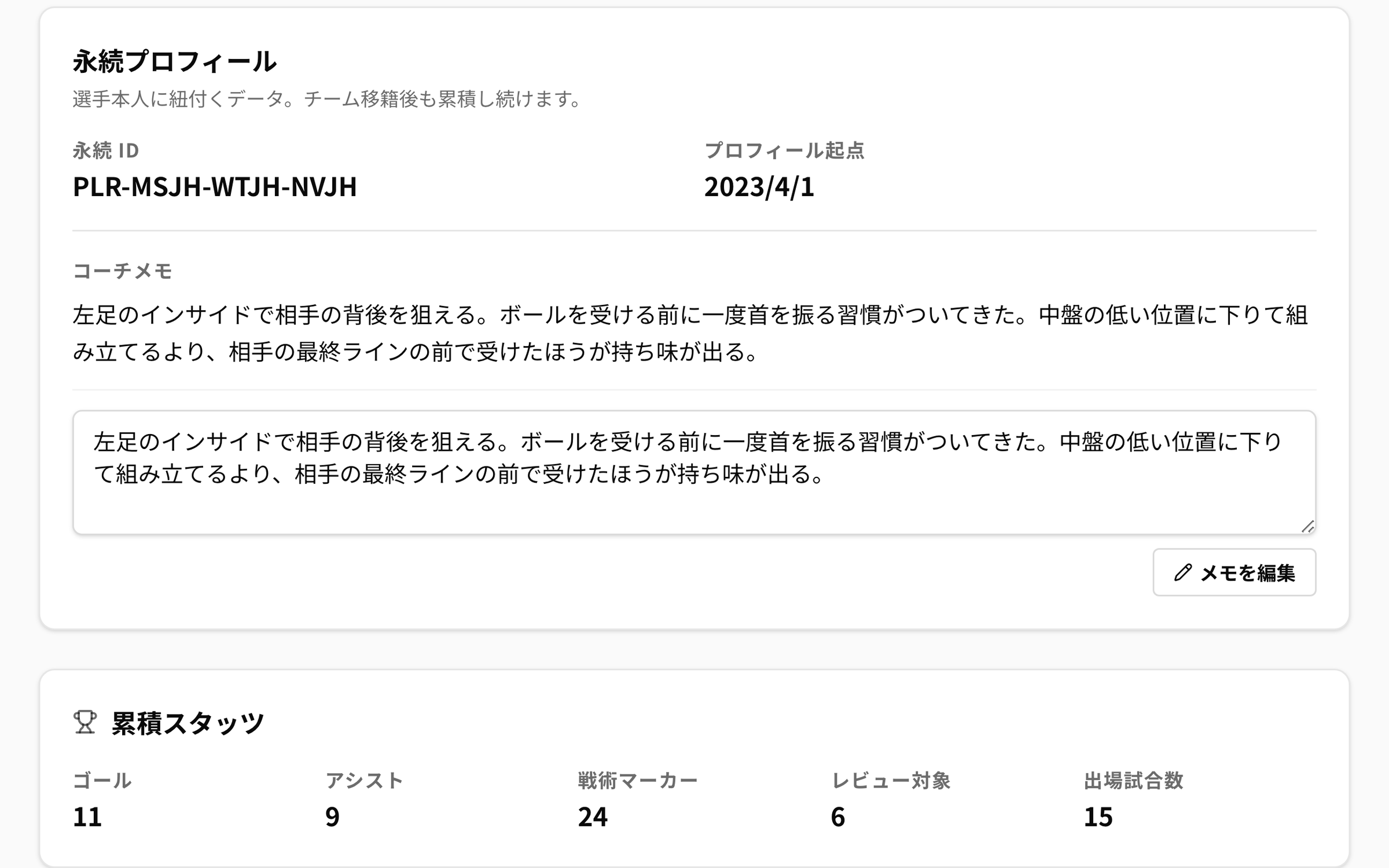
  • IDA persistent ID (a public ID starting with PLR-) and the profile start date
  • MEMOThe coach memo belongs to the player. It stays when the team changes
  • STATSGoals / assists / tactical markers / review markers / matches played — five figures
  • SOURCEMarkers added in video analysis become the cumulative stats as they are

The five cumulative stats (exactly the app’s labels)

  • Goals
  • Assists
  • Tactical markers
  • Review markers
  • Matches played
The “Persistent profile” and “Cumulative stats” of a player record in NEWDIH APP. The persistent ID reads PLR-MSJH-WTJH-NVJH and the profile start date 2023/4/1, followed by the coach memo and its edit field. The card below shows goals 11, assists 9, tactical markers 24, review markers 6 and matches played 15, side by side.
The persistent ID is a public ID that belongs to the player. Cumulative stats stack across team changes.

05 / PERCENTILE

05

Where they stand among their own age group.

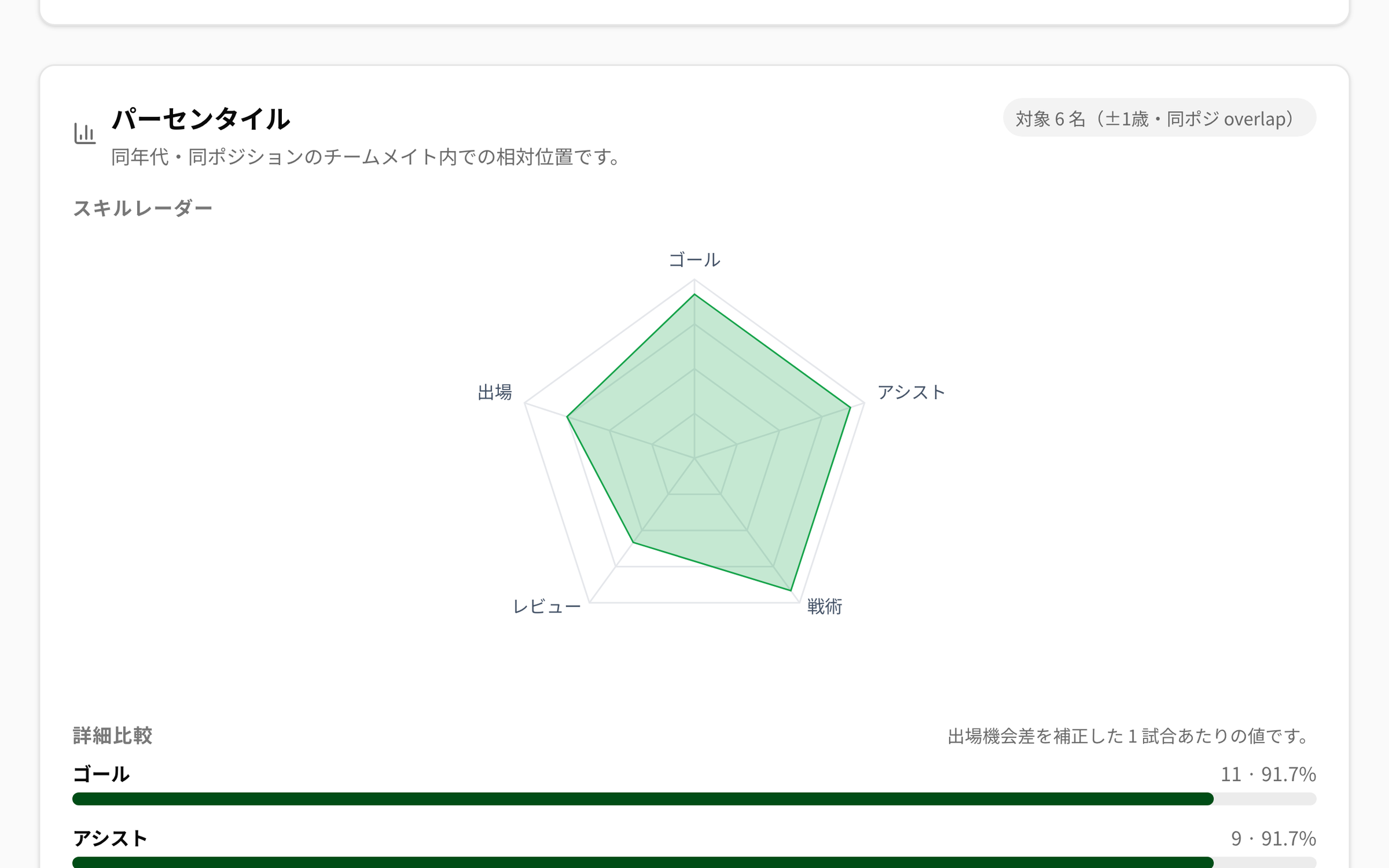
A row of numbers alone does not tell you whether it is a lot or a little. We show the relative position among teammates in the same club, the same age group, with an overlapping position.

  • COHORTDate of birth within ±1 year, with at least one position in common
  • VIEWA skill radar / a detailed comparison normalised per match / distribution histograms
  • REFERENCEReference ranges for the U-15 and U-18 development levels and the Top 5 league average are overlaid
  • SOURCEAn estimate combining Premier League 2023-24 official statistics, JFA U-18 Premier League 2024 official records and NEWDIH internal benchmarks
The “Percentile” section of a player record in NEWDIH APP. The top right reads “n=6 players within ±1y and matching position”, and a five-axis skill radar for goals, assists, tactical, review and matches is filled in green. Below it, “Detailed comparison” lines up the value and the percentile as horizontal bars, such as goals 11 · 91.7% and assists 9 · 91.7%.
The comparison is with “kids of the same age doing the same job”. If there is no one to compare with, nothing is shown.

06 / HISTORY

06

Even when the team changes, it is the same page.

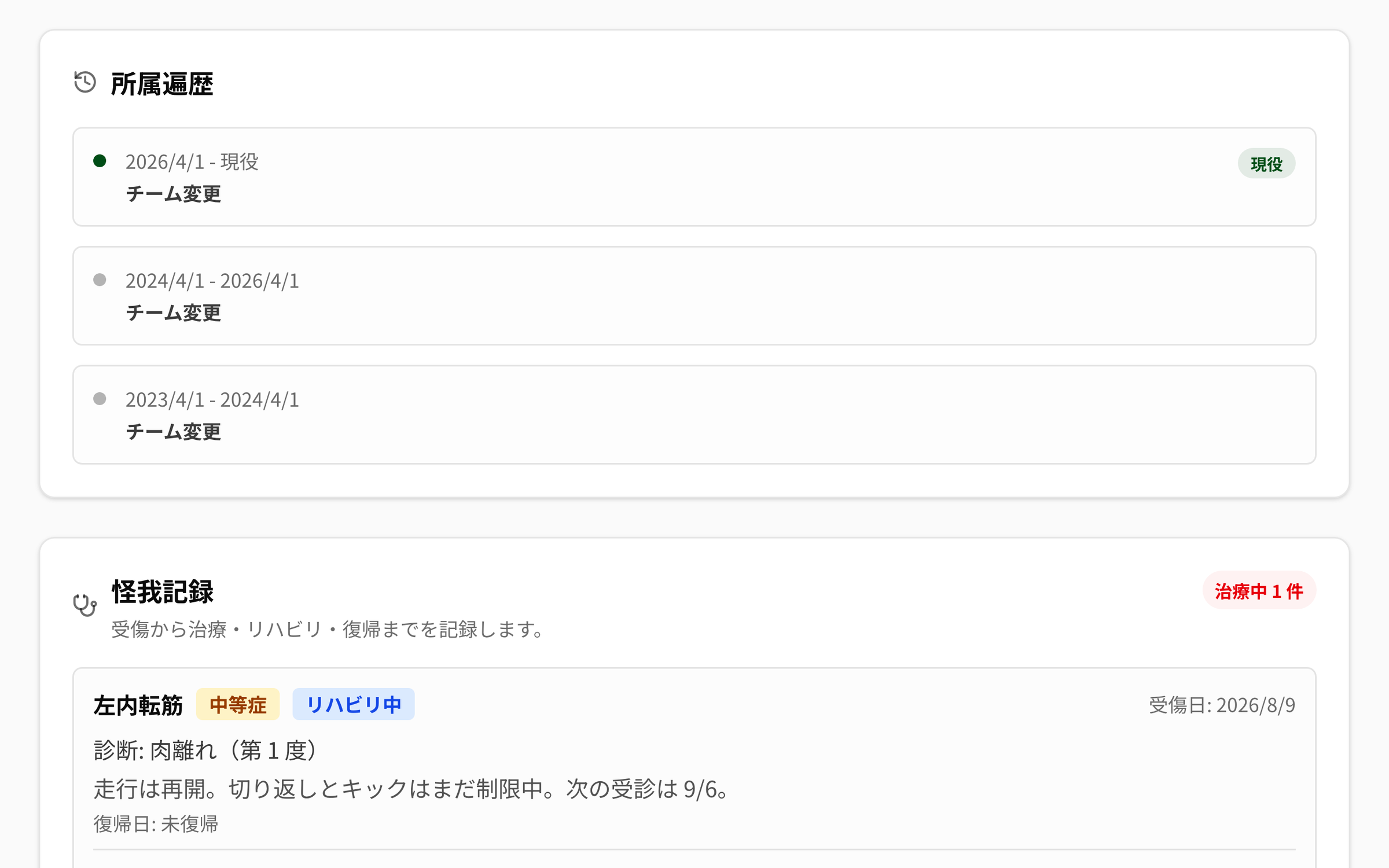
Moving up an age group and changing teams never resets the record. From when to when, and which team, stays inside the record as a row.

  • ROWThe period they belonged to a team, and why it changed (team change, archived, reinstated)
  • NOWThe team they are in right now carries a “Current” mark
  • KEEPArchiving does not erase the history. Come back and another row is added
The “Team history” of a player record in NEWDIH APP. Three rows are listed newest first — 2026/4/1 – Current (team change, with a green “Current” badge), 2024/4/1 – 2026/4/1 (team change) and 2023/4/1 – 2024/4/1 (team change) — and the “Injury record” card follows below.
U-12 to U-13 to U-15. The date of each move stays as a row, so you can trace it later.

07 / INJURY

07

An injury stays until they are back.

No more “wait, where did that kid get hurt last year?”. From the day of the injury through treatment and rehab to the day they return, it is recorded as one entry.

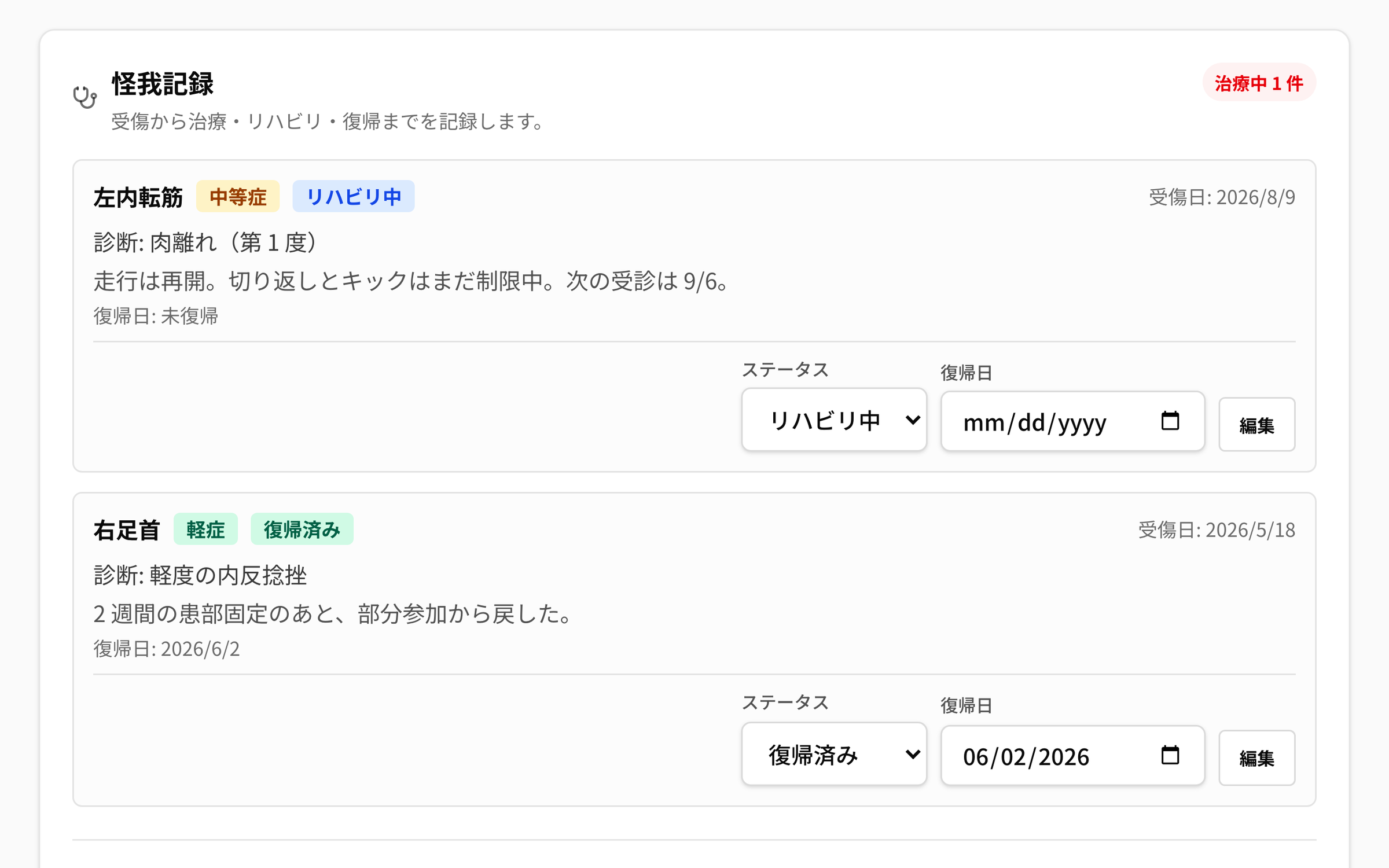
  • RECORDDate of injury, body part, diagnosis, findings / notes, return date
  • SEVERITYSeverity has three levels: Minor, Moderate, Severe
  • STATUSStatus has three levels: In treatment, In rehab, Returned. It cannot be moved back a step (a recurrence is recorded as a new entry)
  • BADGEHow many are not back yet is shown next to this section's heading

Severity (exactly the app’s options)

  • Minor
  • Moderate
  • Severe

Status (exactly the app’s options)

  • In treatment
  • In rehab
  • Returned
The “Injury record” of a player record in NEWDIH APP. A red “1 in treatment” sits to the right of the heading. The first entry is left adductor, moderate, in rehab, with the diagnosis “strain (grade 1)”, the findings, and no return date yet. The second is right ankle, minor, returned, with the return date 2026/6/2.
The status cannot be moved back. If it flares up again, it is recorded as a new entry.

08 / NOTES

08

Words are kept in three kinds.

“That went well”, “that worries me” — you can write them down separately the same day. They stack up with their dates, so six months later you can see the change.

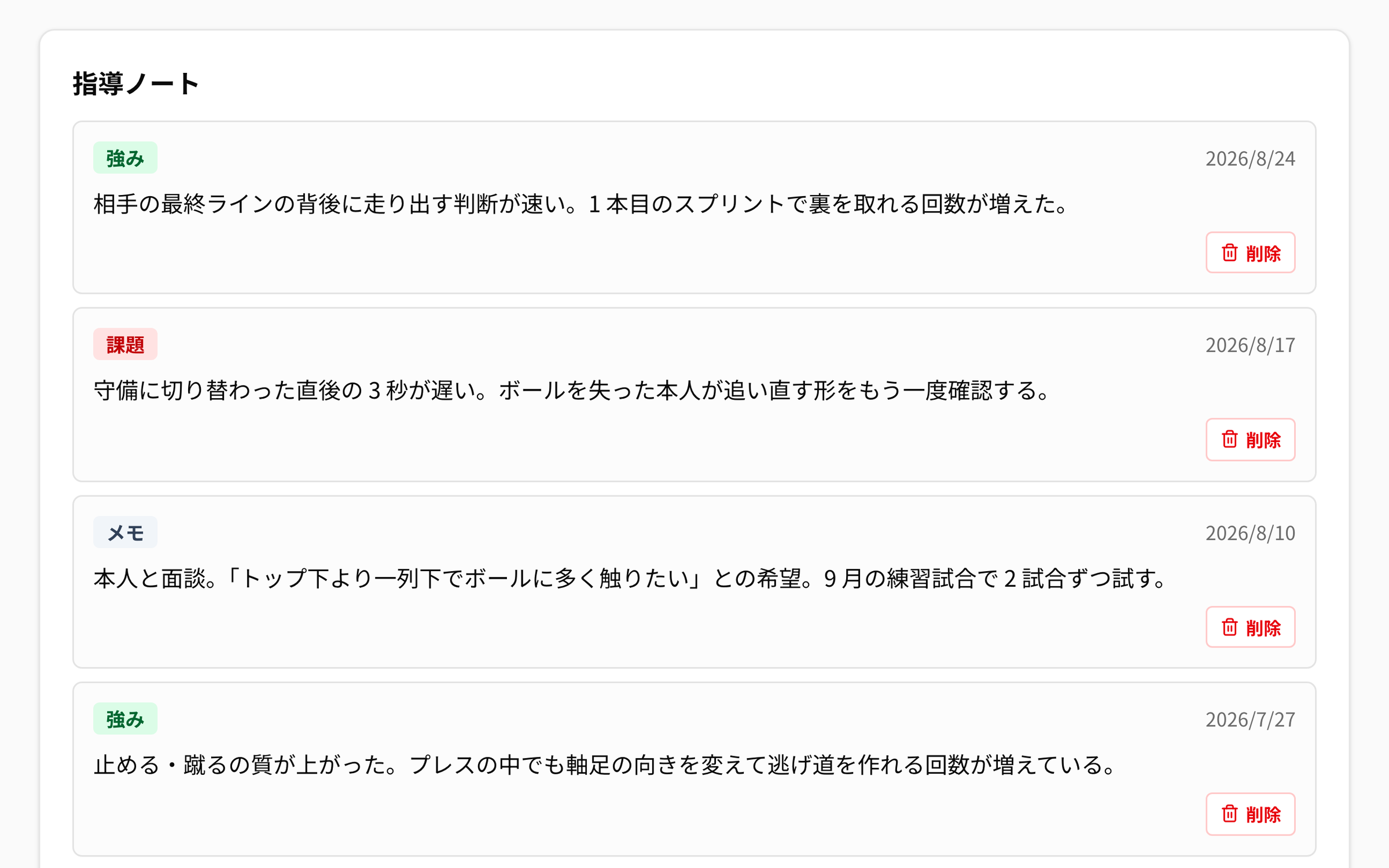
  • TYPEStrength, Weakness and Note — three kinds
  • AUTHOROnly someone whose Passport is registered as a coach can write one
  • SAFETYNotes written by another coach cannot be deleted

Note types (exactly the app’s options)

  • Strength
  • Weakness
  • Note
The “Coaching notes” of a player record in NEWDIH APP. Notes badged green for “Strength”, red for “Weakness” and grey for “Note” are listed newest first, each with its text, its date and a delete button.
Strength, weakness, note. They are split by the kind of content, not by who wrote them.

09 / ALUMNI

09

Even after they graduate, the list continues.

You keep the contact details of graduates and former players as the club's own directory. The invitation to the alumni match and the request to help at training both start here.

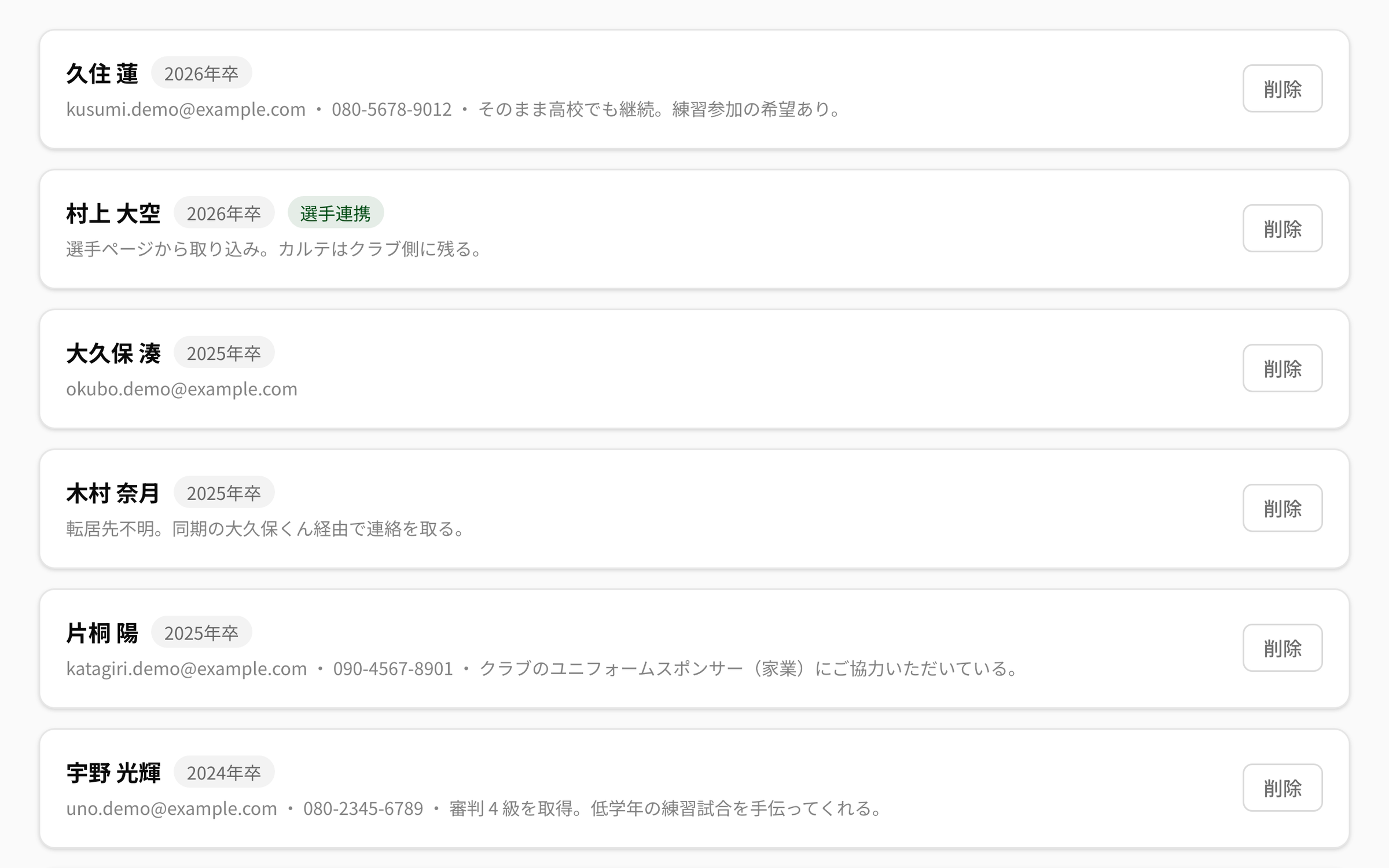
  • ROWName, graduation year, email, phone, notes
  • LINKA player archived with the reason “Graduated” joins the directory in one click
  • MARKA row brought over from a player carries a “Linked player” mark
  • PRICEOf these three, this is the only paid one (¥1,000/month)
The “Alumni directory” in NEWDIH APP. Graduation-year badges such as “Class of 2026” and “Class of 2025” sit next to each name, with the email address, phone number and notes on one line below. A row brought over from a player page carries a green “Linked player” badge.
A directory ordered by graduation year. A row brought over from a player carries a “Linked player” mark.

Three steps, starting today.

STEP 01

Hand over the roster

Excel, a paste, or a photo of the paper roster. Check what we read out, then save it.

STEP 02

Open one line

That player gets a persistent ID and the record begins. Physical details and career history are entered by the player from Passport.

STEP 03

Keep adding

Strengths, weaknesses and notes, injuries, markers from matches. When they graduate, hand it on to the alumni directory.

Frequently Asked Questions

Q01Are the player roster and player records paid?

Both are free. No module contract is required. The only paid one is the alumni directory, at ¥1,000/month.

Q02We only have the roster on paper.

A photo taken on a phone (up to 3) or a PDF (up to 8MB) can be read too. Excel (.xlsx), CSV and text pasted from an email are supported as well, and you can register up to 200 players at once. Only the rows we could not read are put back to you.

Q03If they move up an age group and change teams, is the record lost?

No. The record is tied to a persistent ID that belongs to the player. Which team they were in and when stays as a row in the team history, and the cumulative stats — goals, assists, tactical markers, review markers and matches played — keep stacking across teams.

Q04What happens to the record if they move to another club?

The record is a record the club holds, so it stays with the previous club. At the new club a fresh record starts, and the cumulative stats stack from there (if only the team changes inside the same club, the same record carries on, as in the question above). What does follow the player is NEWDIH Passport. Height, weight, position, dominant foot and where they have played until now belong to the player, so once the new club links their Passport, all of it appears on the cover of the new record.

Q05Who enters the height and weight?

The player does, from NEWDIH Passport. For a player officially registered with the club, a coach can also edit them directly, in which case the player submits a change request instead. The coach approves or rejects it.

Q06What is the percentile compared against?

Teammates in the same club whose date of birth falls within ±1 year and who share at least one position. When there is no one to compare with, no ranking is shown and we say so. Reference ranges for the U-15 and U-18 development levels and the Top 5 league average are also overlaid, but those are estimates built from official statistics and internal benchmarks.

Q07What happens to a graduated player's record?

Even after archiving for graduation, leaving or another reason, the record and the history stay with the club. The contact details can be handed to the alumni directory in one click, and the row carries a “Linked player” mark.

Let's put three years
on one page.

You can start by handing over the roster. The player roster and player records are free.