MARKETPLACE & DRILL MARKET

Training sessions that
travel beyond the club.

The NEWDIH Marketplace sits in the same place whichever stage you are in. Inside it, the Drill Market lets a coach put a price on a drill they built, and lets a coach at another club buy it and drop it straight into their own session.

Opening the Marketplace is free, and so is listing a drill. The only charge is a fee when something sells.

Every drill has these three visibility settings.
Pick the last one and a price field appears.

THE PROBLEM

The better the session,
the more it stays put.

A well-built session usually lives in one coach's hands. Drawn out, annotated, reworked again and again — and used only inside that club. Meanwhile the coach planning next week starts from the same blank page every time. The only thing missing was a way to hand it over. The people who can build sessions, and the people who need them, are already both here.

01MARKETPLACE

The way in is always the same door.

The Marketplace sits in the same spot in the sidebar for players, coaches and Lifeballers alike. Switching stage does not move it. Inside are the entrance to the official NEWDIH store, crowdfunding for newly founded clubs, and the Drill Market where training drills are bought and sold.
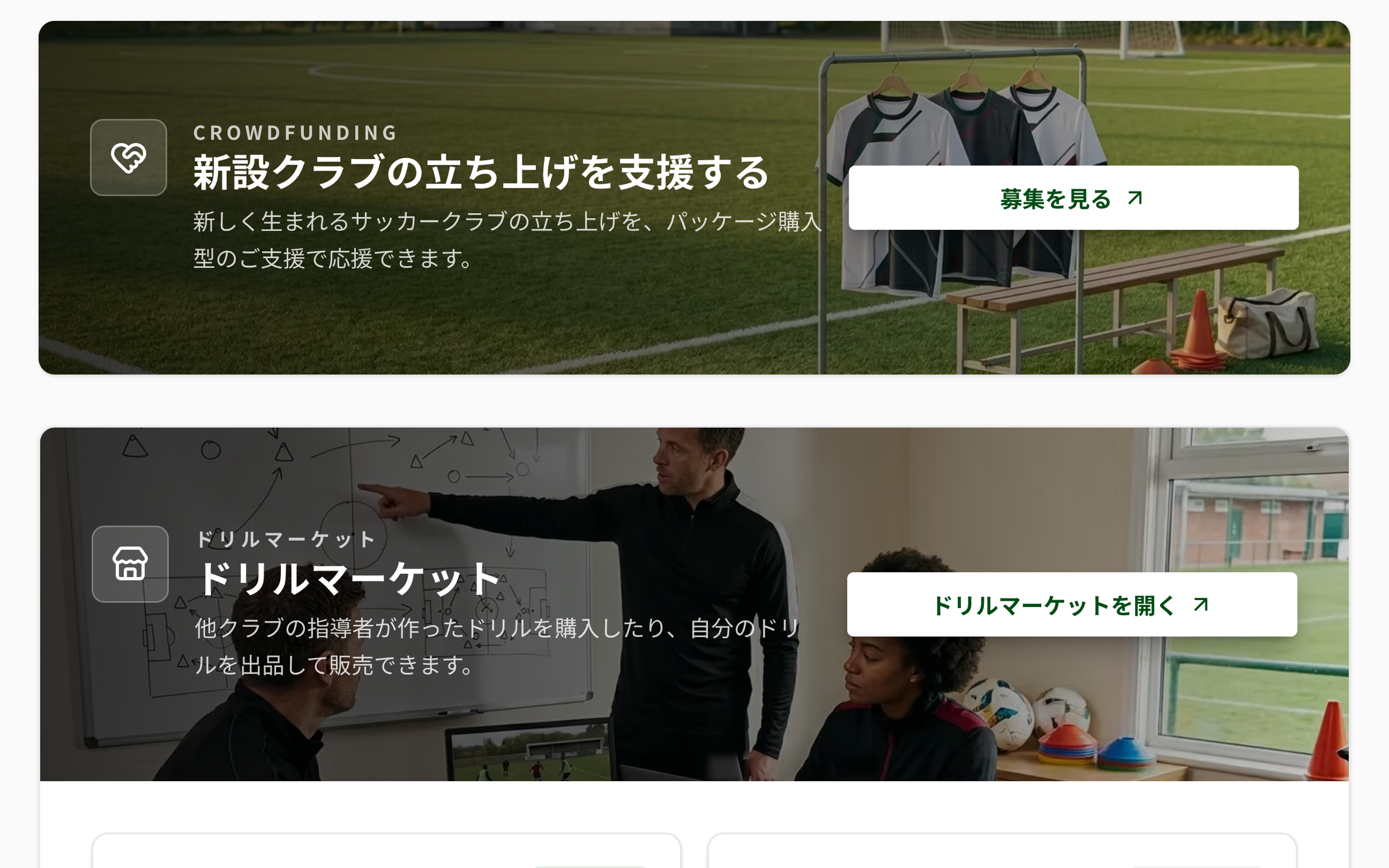
NEWDIH APP Marketplace screen: a crowdfunding entrance card reading “Support the launch of a new club” and a Drill Market entrance card reading “Drill Market — buy drills built by coaches at other clubs, or list and sell your own”, stacked vertically over photographic backgrounds
The entrances stack vertically. The Drill Market opens from "Open the Drill Market" on this band.
FIXED

It lives in the Account group of the sidebar: Passport, Marketplace, Feedback and How-to Guide — four items

ALL

Change stage and neither its place nor its order moves

INSIDE

Entrances to the official store, crowdfunding for new clubs, and the Drill Market

FREE

Opening the Marketplace itself costs nothing

SWIPE →
02BUY

What's on the rail is somebody's session.

The Drill Market lists drills that coaches at other clubs have put up for sale, newest first. Each card carries a name, description, duration, category and price. Filtering works on name and description, so typing what you are after narrows the rail. Anything NEWDIH itself listed is marked Official.

NEWDIH APP Drill Market list screen: under a “Search by drill name or description” field, cards are laid out two across, each with a name, description, duration, category and price. The first carries Official and Purchased badges, the second a Your listing badge
Three tags can appear: Official, Purchased, Your listing. The price sits large in the bottom right.
PRICE

A listing price is a whole number from ¥100 to ¥100,000

SORT

They are ordered newest listing first. Anything unlisted disappears

FIND

Filter on name and description

BADGE

Three tags can appear: Official, Purchased, Your listing

CATEGORY

Nine categories

Warm-upShotsPassingPossessionDefenseSet piecePhysicalSmall-sided gameOther

SWIPE →

03OPEN

What you see before buying, what opens after.

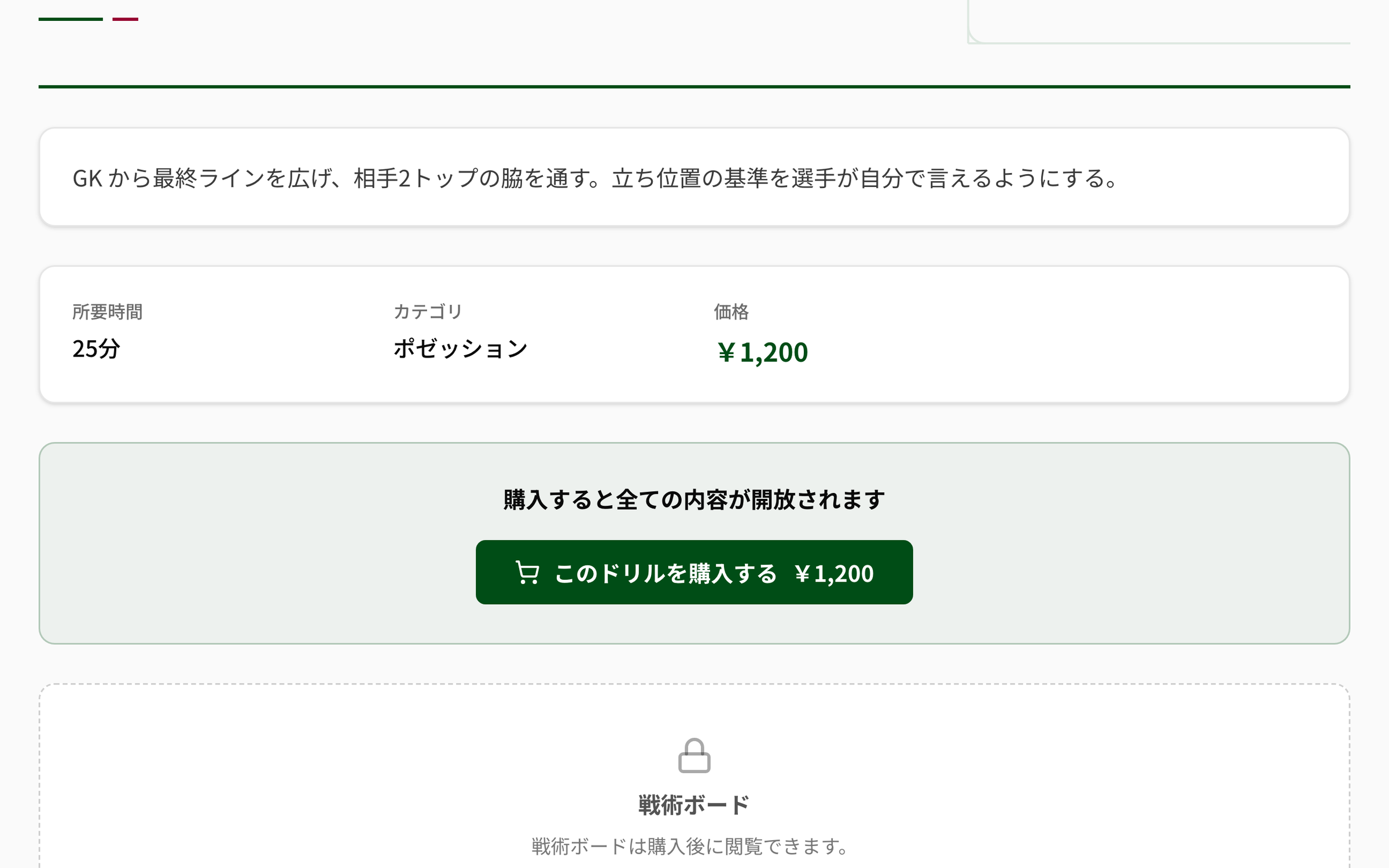
Before buying you can read the name, description, duration, category and price. The tactics board and coaching notes stay covered, with only "Purchase to unlock everything" showing. Buy it and the same screen simply opens: the diagram and the notes become readable.

NEWDIH APP Drill Market detail screen before purchase: under the description sit duration 25 min, category Possession and price ¥1,200, then a band reading “Purchase to unlock everything” with a buy button, and below that a padlock and a covered panel reading “The tactics board is available after purchase.”
Anyone can read as far as the price. Only the diagram and the coaching notes are behind the lock.
BEFORE

Name, description, duration, category and price

AFTER

The tactics board and coaching notes, plus equipment needed and field size

MINE

Only the person who bought it can read it. It does not spread to other coaches at the same club

USE

A drill you bought slots into that day's session, and prints with the session plan

KEEP

Even if a listing is taken down, the buyer keeps access

SWIPE →

BUYING

From the buying side, a card with a price on it.

Name and description, duration, category, and the price. Anyone can read that far. Only the diagram and the coaching notes are still covered.

SELLING

From the selling side, a card of visibility settings.

Club only, share free with all clubs, or sell on the market. Type in a price and the estimated payout appears right there.

The same drill, flipped by the side you stand on.

04SELL

The same card, turned over.

The edit screen for your own drill has three visibility settings side by side. Club only. Share free with all clubs. Sell on the market. Pick the paid one and a price field appears, with the estimated payout for that amount right underneath. To sell you first register a payout account (Stripe).

NEWDIH APP drill edit screen, visibility settings: three radio buttons stacked — Club only, Share free with all clubs, Sell on the market — with the paid option selected. Below, a price field holding 1100, the current fee rate of 30%, and an estimated payout of ¥770
The price field sits under the three options. The payout for what you typed appears right there.
THREE

Club only / Share free with all clubs / Sell on the market

RANGE

The price is a whole number from ¥100 to ¥100,000

NET

The estimated payout appears right under the amount you typed

KYC

Selling needs three things: business details, charges and payouts

NO

You cannot buy your own listing, and the same drill cannot be bought twice

SWIPE →

05EARN

What sells goes straight to your account.

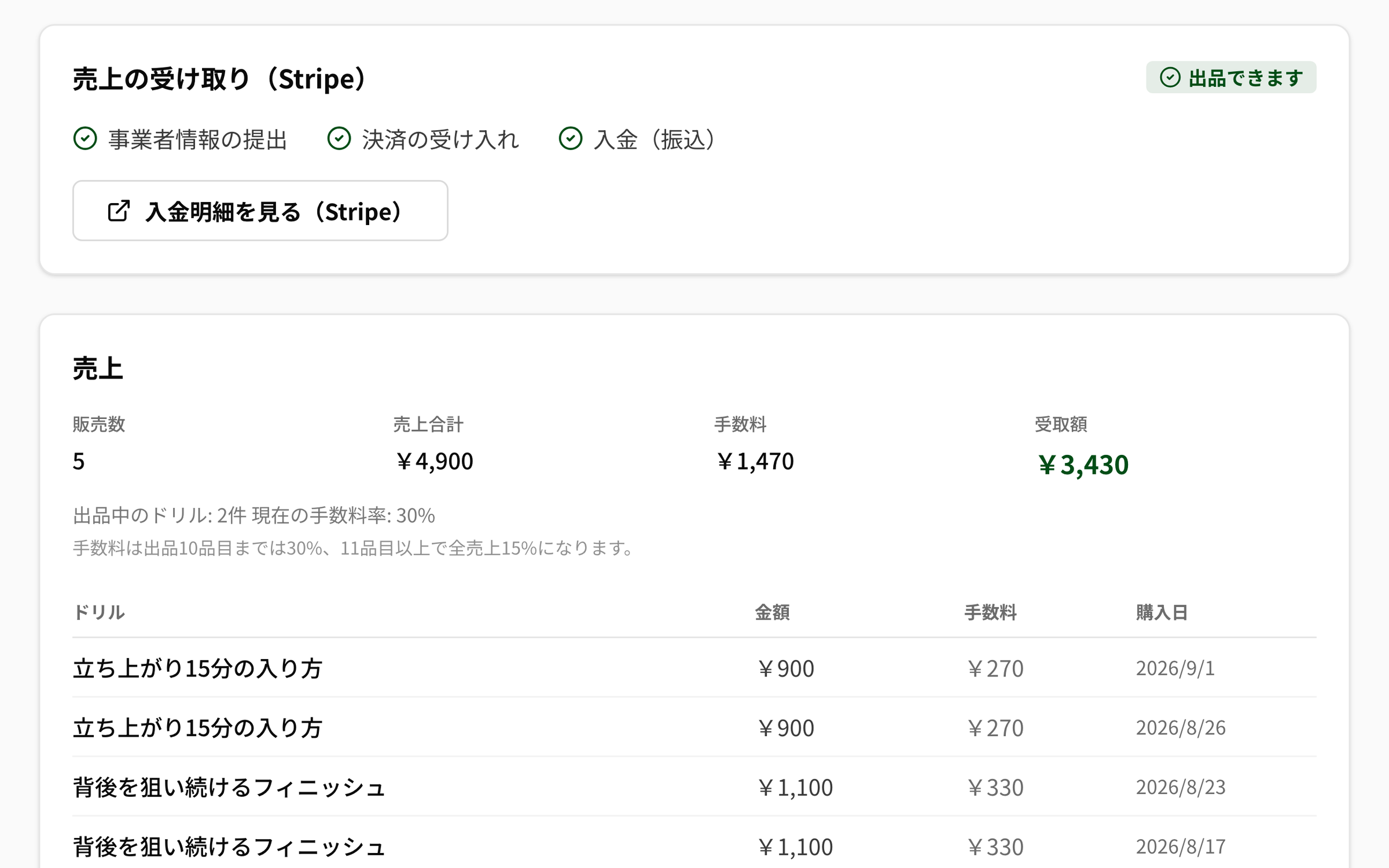
The sales page shows the three payout checks, then units sold, gross, fees and net payout, and a line for every sale. The fee moves in a step: 30% while you have up to 10 listings, and 15% on all of that seller's sales once there are 11 or more. The fee is recorded at the moment of purchase, so a later change in rate leaves past sales untouched.

NEWDIH APP Drill Sales screen: under Getting paid (Stripe), business details submitted, charges enabled and payouts enabled are ticked and it reads Ready to sell. Below are 5 sold, ¥4,900 gross, ¥1,470 fees and ¥3,430 net payout, followed by a line for each sale with drill name, amount and date
With all three ticked it says Ready to sell. Below are units sold, net payout, and a line per sale.
TIER

30% up to 10 listings, 15% on all sales from 11

FIX

The fee is recorded at the moment of purchase. Past sales do not move

DOWN

Fractions are rounded down. Anything under one yen stays with the seller

OFFICIAL

NEWDIH's own official listings carry no fee

PAYOUT

Payout details are read by the seller in Stripe

SWIPE →

Three steps, starting today.

STEP 01

Open the Marketplace

"Marketplace", in the Account group of the sidebar. Same place from any stage.

STEP 02

Buy one and put it in a session

Read as far as the price, then buy. The drill drops into that day's session and prints with it.

STEP 03

Put a price on a card of your own

Switch visibility to "Sell on the market" on the edit screen and type a price. The estimated payout appears right away.

Frequently Asked Questions

Q01Does listing cost anything?

Listing itself is free. The only charge is a fee when something sells: 30% while you have up to 10 listings, and 15% on all of that seller's sales once there are 11 or more. The fee is recorded at the moment of purchase, so a later change in rate leaves past sales untouched. Fractions are rounded down, so anything under one yen stays with the seller. To receive the money you do need a Stripe payout account — business details submitted, charges enabled and payouts enabled.

Q02Can everyone at my club see a drill I bought?

No. Only the person who bought it can read it, and it does not spread automatically to other coaches at the same club. That said, once the buyer drops the drill into a session, it is shared as part of that session plan.

Q03What price can I set, and can I change it later?

Any whole number from 100 to 100,000 yen. Type a price on the edit screen and the estimated payout, with the current fee rate deducted, appears right there. You can change the price later, but the fee and payout for sales already made were recorded at purchase, so nothing is recalculated retroactively.

Q04How much can I see before buying?

Name, description, duration, category and price. The tactics board and coaching notes stay covered, showing only "The tactics board is available after purchase." Buy it and the same screen opens, down to the diagram, the coaching notes, the equipment needed and the field size.

Q05If I take a listing down, does the buyer lose access?

No, the buyer keeps access. Taking it down removes it from the list so nobody new can buy it, but anyone who already bought it still sees the whole thing and can still use it in a session.

Q06Do I need a club management plan to use this?

Not on the buying side. The Drill Market lives inside the Marketplace and opens independently of the club management features. On the selling side you change the visibility setting from the edit screen of your own drill, so your club needs to be able to create drills. Drill management itself is a free feature.

Put that card out there too.

Buying and listing both start from an account. Registration is free.