NEWDIH OPPONENT NETWORK
OPPONENT MAP

Your next practice match, decided by QR.

Trade phone numbers as a stand-in for a business card at a tournament, then lose the note. Finding opponents always ends up relying on the previous coach's network.
NEWDIH connects you with coaches you meet on the spot, by QR code, building up your club's "opponent ledger." Post your open dates, send offers, and once accepted, a notification reaches you both. Even if you're not a phone person, the practice match gets set.

Signing up is free. All you need is an email address.

The real NEWDIH opponent ledger screen. A button for connecting face-to-face by QR, a button for practice match scheduling, category/area filters, and a list of connected opponents are all lined up.
The real opponent ledger screen. Connected opponents are listed with their category and area.
AREA 01

Connect, right where you meet.

Between matches at a tournament, show your QR code along with a greeting. Have the other coach scan it and sign in, and that's it — you're both registered on each other's ledger. No business cards, no jotting down phone numbers.
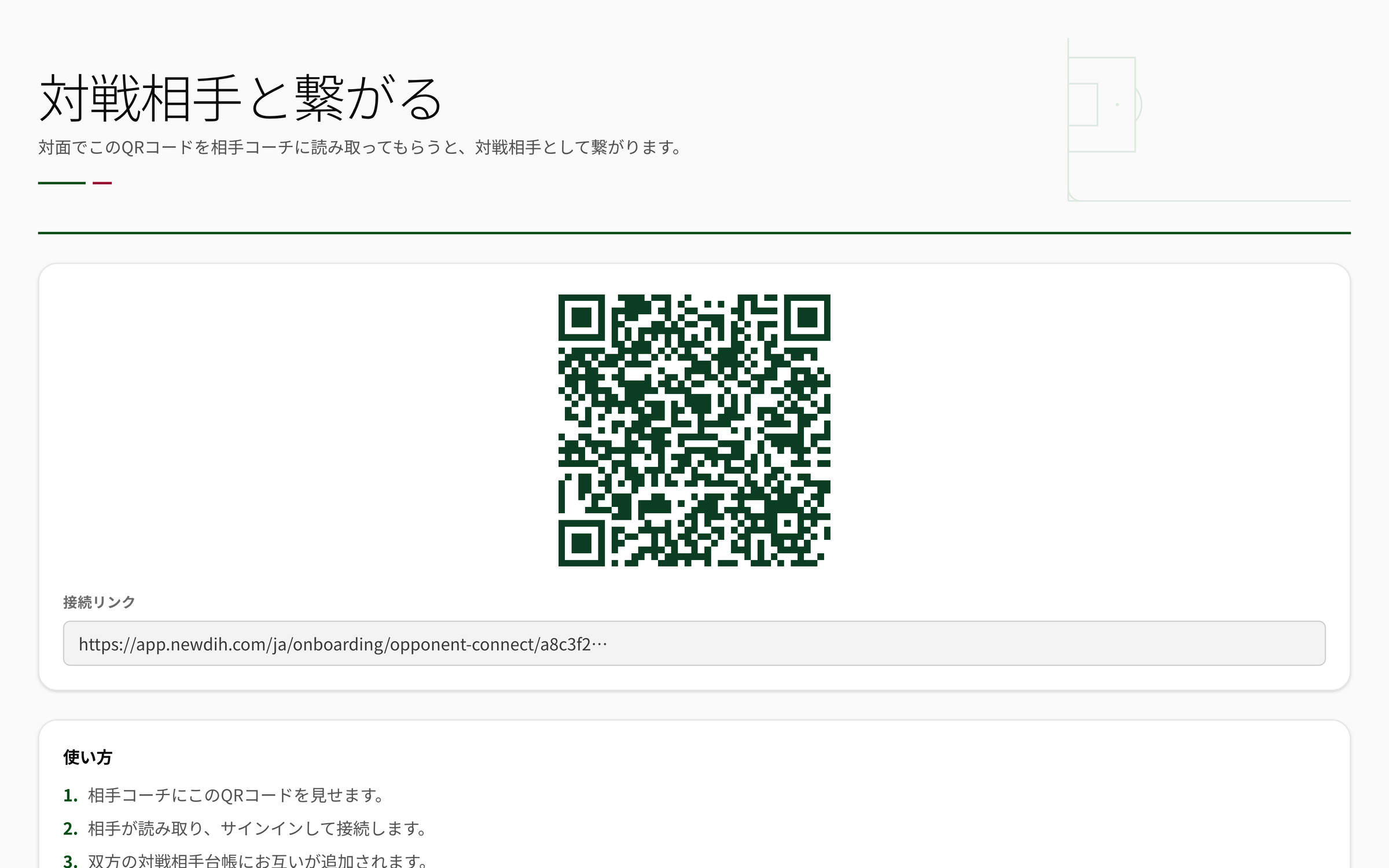
The real screen for connecting with an opponent. A QR code, a connection link, and instructions for how to use them are displayed (demo club shown).
01
Show it → Scan it → Done
Show your QR code to the other coach, and once they scan it and sign in, each of you is added to the other's ledger. It takes less time than the greeting itself.
02
You can connect with a link too
Can't scan it on the spot? Send a connection link and you connect the same way. Even if the link expires, you can reissue it from the ledger.
03
Add opponents who aren't using it yet, too
Even if the other side isn't using NEWDIH, you can add just the club name to your ledger ahead of time. Hand over an invitation link, and once they connect, it links up automatically.
AREA 02

Turn a coach's memory
into the club's ledger.

"Their number 15 is fast." "They've got an artificial turf ground." Information about opponents that used to live only in a coach's head goes into a ledger with category, area, and notes. Even when a coach moves on, the club keeps the network.

Your club Kawaguchi City FC U-15 / Southern prefecture Omiya United JY U-13 / Central prefecture Urawa Green SC Pending invitation Pending invitation
Your club Connected Pending invitation (listed on the ledger even before connecting)
Category
U-15U-13U-12
Tag each opponent however you like, and use it to filter.
Area
Organize by where they're active — "southern prefecture," "neighboring prefecture," and so on. Handy for planning away trips.
Notes
Ground conditions, team characteristics, the best time of day to reach them. A handoff note for whoever contacts them next.
Past matches
Link matches recorded in Match Management to this opponent. "When was the last time, and what was the score?" — you can trace it back from the ledger.
AREA 03

Turn "let's do this again sometime"
into an actual date.

Practice match promises that usually end as small talk get pushed forward by the app. Post the days you're free, and send an offer for the date the other side wants. Once it's accepted, a notification reaches you both, and the date is locked in.

The real practice match scheduling screen. There are accept and decline buttons for offers you've received, with a form below for choosing an opponent and preferred date to send an offer.
From Kawaguchi City FC Coach
Awaiting reply
Preferred date: 2026/08/11
How about an afternoon kickoff at our ground (artificial turf)?
01
Post your open dates
Register the days you could play a match, with a note attached. Show your availability up front, without waiting on the other side.
02
Offers come with a preferred date
Send a connected opponent an offer with a date and a message. Add a line to discuss the venue or meeting time too.
03
Accept it, and both sides get notified
When the other side accepts, a notification reaches you both. Register the confirmed match in Match Management, and it carries straight through to the day-of record.
AREA 04

One season, and the map grows.

One person per tournament, one club per away trip. A ledger that keeps building means next season's search for opponents never starts from zero.

QR
Connect on the spot
Ledger
Category / Area / Notes
Offer
Reach out with a preferred date
Notification
Accept it, and confirmation reaches both sides
AREA 05

Three steps, starting at your next tournament.

STEP 01
Show your QR code
Show your QR code to coaches you meet at tournaments and away trips, and connect.
STEP 02
Add a note to the ledger
Category, area, a quick note. Write it down while you still remember.
STEP 03
Send an offer
Show your open dates and send an offer for the date you'd prefer. Once the acceptance notification arrives, all that's left is waiting for the day.
AREA 06

Frequently Asked Questions

You can add them to the ledger even without the other side present. List just the club name and a note, hand over an invitation link, and once they register, it links up automatically so you can start exchanging offers.

You're each registered as an opponent on the other's ledger. The category, area, and notes you write on your ledger are for your own organizing and aren't visible to the other side.

Register it as a match in Match Management, and it carries through to the day-of record — record sheet, formation, and scoring, all included. Any match you record is linked on the ledger as part of your match history with that opponent.

Signing up is free. Any coach already using Club Management can start using opponent connections, the ledger, and scheduling right away.

NEWDIH OPPONENT NETWORK

Your next tournament
becomes your network.

Signing up is free. Start by opening your own QR code.